The Gaudio OTT dashboard
The Dashboard is the first screen you see after signing in: the morning briefing and the state of the market on top, then an immediate overview of the indices, futures and ETFs that matter.
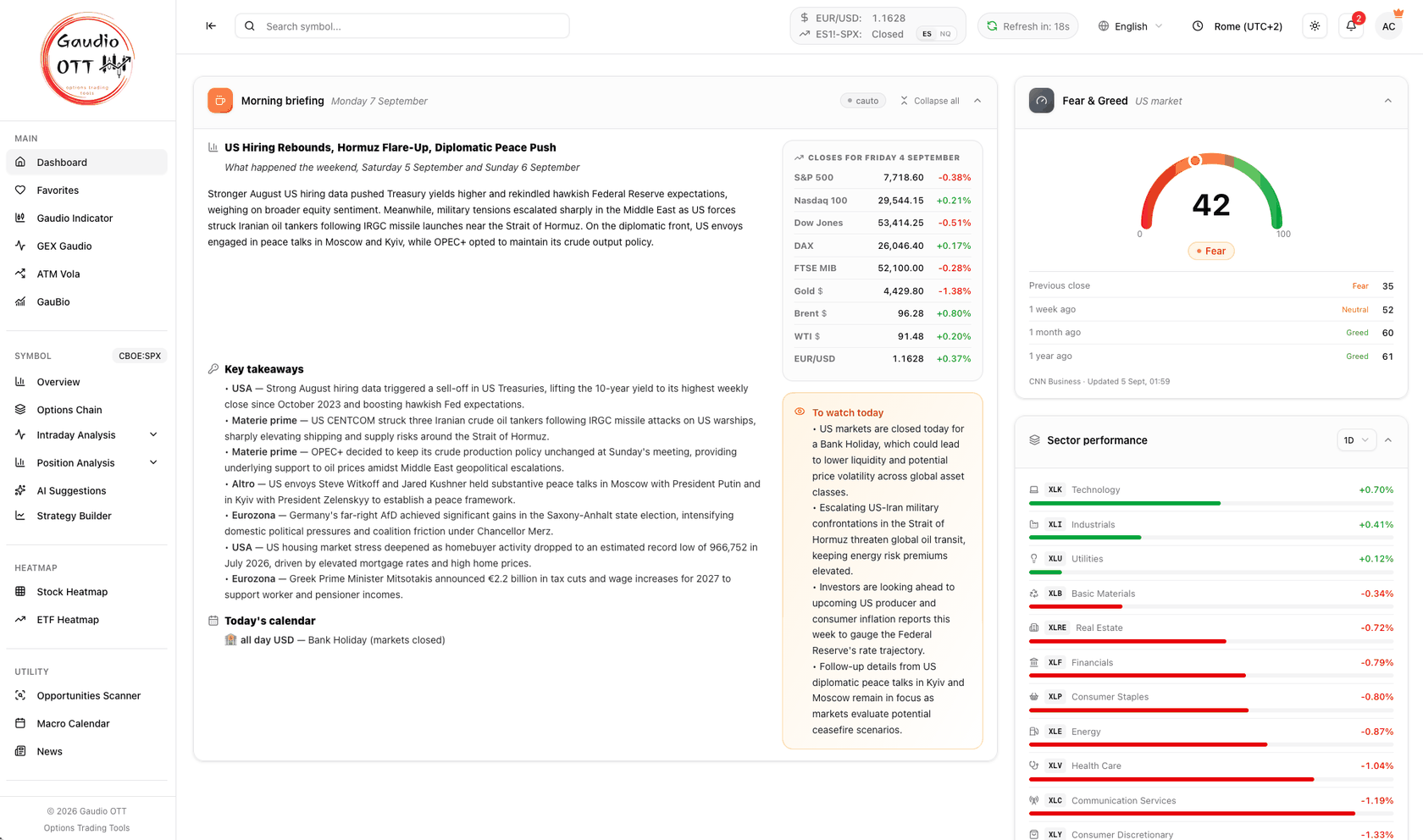
The top of the Dashboard: the Morning briefing on the left, Fear & Greed and Sector performance in the right column.
What this page shows
Section titled “What this page shows”The dashboard has two parts.
The market cards, at the top
Section titled “The market cards, at the top”Three cards, available on every plan, each collapsible with a click on its header:
- Morning briefing — one edition every morning: what happened in the last session, the closes, the key takeaways, the day’s macro calendar and what to watch.
- Fear & Greed — the sentiment of the US market from 0 to 100, with the readings from the previous close, week, month and year.
- Sector performance — the eleven US sectors ranked over the period you choose, from one day to one year.
The Collapse all button in the briefing header closes or reopens the three together. Each choice is remembered by your browser, and with the briefing collapsed the two market cards spread across the freed width.
The instrument blocks, below
Section titled “The instrument blocks, below”Four blocks, top to bottom:
- Your Symbols — the customizable cards with the instruments you choose (Premium and Ultra).
- Major Indices — S&P 500 (SPX), Nasdaq 100 (NDX), Russell 2000 (RUT) and Dow Jones (DJI).
- Futures — the most followed contracts: E-mini S&P 500 (ES), E-mini Nasdaq 100 (NQ), E-mini Russell 2000 (RTY) and VIX futures (VX). This block is included in Premium and Ultra.
- ETFs — SPY, QQQ, DIA and IWM.
On Free and Strategy, Your Symbols and Futures keep their place but show blurred cards with a lock: the numbers on them are example values, not market data. Clicking one opens the plan page.
At the bottom of the page, Search Symbols repeats the symbol search of the top bar, with a row of popular symbols (SPX, ES1!, AAPL, MSFT, NVDA and others) that open their overview in one click.
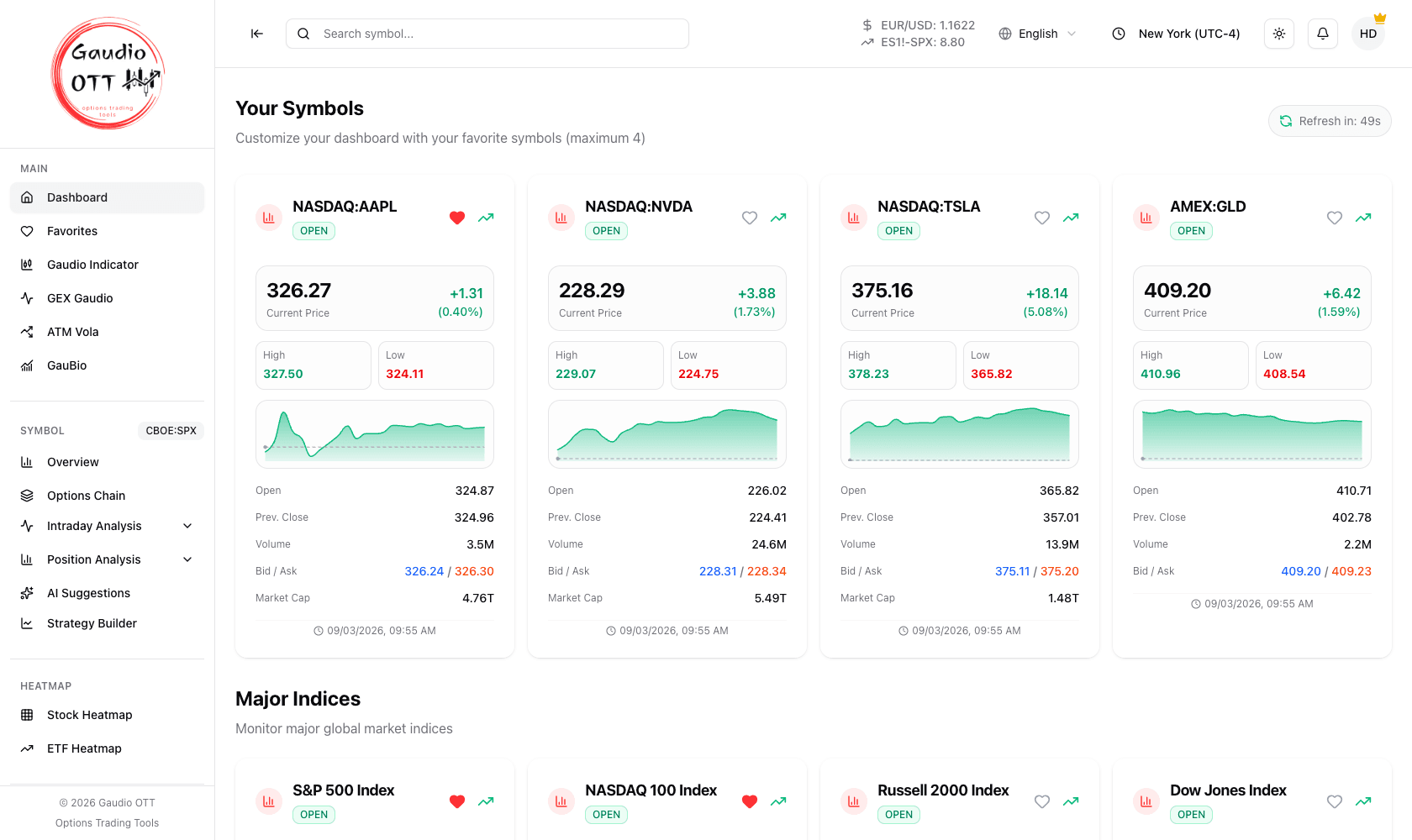
The instrument blocks: the four customizable cards on top, with the Major Indices, Futures and ETFs blocks below.
Why traders use it
Section titled “Why traders use it”It answers two questions before the open: what did I miss overnight? and is today a broad move or a narrow one? The briefing and the sector ranking cover the first one; the instrument blocks cover the second.
Comparing the indices against the futures and the ETF block tells you whether the move is index-wide, concentrated, or already priced into the futures ahead of the cash open. That read decides which symbol is worth opening in detail.
How to read an instrument card
Section titled “How to read an instrument card”Each card shows:
- the market status in the top corner: open, closed, holiday, pre-market or post-market;
- the current price;
- the daily change, in absolute and percentage terms;
- the session high and low, then open, previous close, volume and bid / ask (market cap too, for stocks);
- a mini chart of the recent trend;
- the time of the last quote at the bottom, in your account timezone.
Two interactions:
- the heart icon adds or removes the instrument from your favorites;
- clicking the card opens the Symbol overview of that instrument, which makes it the active symbol for the whole Symbol section.
Automatic refresh
Section titled “Automatic refresh”Dashboard data refreshes automatically every 60 seconds, and the Refresh in countdown in the top bar shows the time remaining until the next refresh. The three cards at the top follow the same cycle, but their sources have their own pace: one briefing edition per morning, and a Fear & Greed reading recomputed a few times a day. Coming back to the tab after leaving it in the background triggers an immediate refresh. See Is the data real time?
How to use it inside Gaudio OTT
Section titled “How to use it inside Gaudio OTT”Use the dashboard as the starting point of every session: read the briefing, take a quick read of the overall market, then open the detail of a single instrument from its card or from a sector row. From the overview you reach the Options Chain and the intraday and position analyses through the side menu.
Common mistakes
Section titled “Common mistakes”- Treating the mini chart as an analysis chart. It is a trend cue; the real chart is on the symbol overview.
- Reading the blurred cards on Free or Strategy as prices. Under the lock of Your Symbols and Futures there are example values: those blocks belong to Premium and Ultra.
- Comparing prices captured at different refreshes. Check the countdown before reading two numbers to the decimal.
Frequently asked questions
What does the Gaudio OTT dashboard show?
Two parts. At the top three market cards: Morning briefing, Fear & Greed and Sector performance. Below, four blocks: your customizable cards, the major indices (SPX, NDX, RUT, DJI), the most followed futures (ES, NQ, RTY, VX) and the main ETFs (SPY, QQQ, DIA, IWM), then a symbol search with the popular symbols. Each card carries market status, price, daily change, session high and low, open, previous close, volume, bid / ask and a mini chart.
What are the three cards at the top of the dashboard?
The Morning briefing, with one edition every morning; Fear & Greed, the sentiment of the US market from 0 to 100; and Sector performance, the eleven US sectors ranked over the period you choose. All three are available on every plan and each one can be collapsed by clicking its header.
How do I open the detail of an instrument from the dashboard?
Click anywhere on its card. That opens the Symbol overview of the instrument and makes it the active symbol, so every page in the Symbol section of the side menu then refers to it.
How often does the dashboard refresh?
Every 60 seconds automatically, with a countdown showing the time until the next refresh. Returning to a background tab triggers an immediate refresh; there is no manual refresh button.
Why are the futures cards blurred?
The Futures block, like Your Symbols, is part of the Premium and Ultra plans. On Free and Strategy it shows blurred cards with a lock and example values; clicking one opens the plan page.
How do I add an instrument to my favorites from the dashboard?
Click the heart icon on its card. A filled heart means the instrument is in your favorites; clicking again removes it.
Related pages
Section titled “Related pages”- Morning briefing
- Fear & Greed
- Sector performance
- Customizable cards
- Favorites
- Symbol search
- Symbol overview
- Heatmaps
Ready to use Gaudio OTT?
Section titled “Ready to use Gaudio OTT?”Open your free account and put what you just read into practice.