

GauBio
GauBio is an invite-only tool that shows, in a single view, the market maker’s operating levels (supports and resistances) overlaid on the real-time price, together with a proprietary indicator in the lower panel. It is designed for traders working intraday on indices and futures who want the areas where price tends to react under control at a glance.
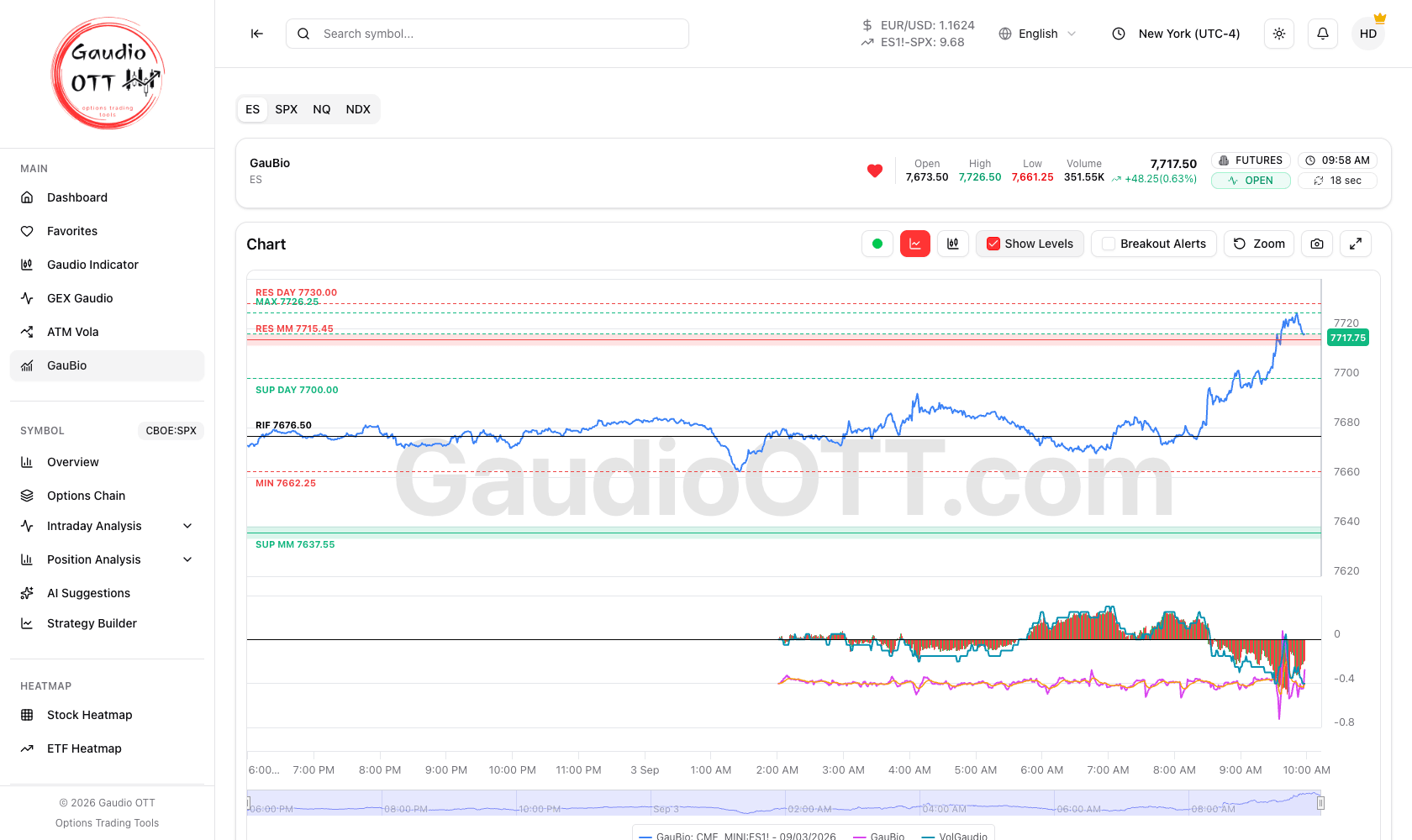
GauBio on ES: the ES, SPX, NQ and NDX tabs, the date selector, the price chart with the MM and daily levels, and the indicator panel below.
How access works
Section titled “How access works”GauBio is an invite feature: it is not tied to the subscription plan but enabled individually by staff. When it is active on your account, the GauBio entry appears in the side menu, in the Main section. If you do not see it and believe you should have access, contact support.
Selecting the symbol
Section titled “Selecting the symbol”The tabs at the top switch the instrument analysed:
| Tab | Instrument |
|---|---|
| ES | S&P 500 future (CME_MINI:ES1!) |
| SPX | S&P 500 index (CBOE:SPX) |
| NQ | Nasdaq 100 future (CME_MINI:NQ1!) |
| NDX | Nasdaq 100 index (NASDAQ:NDX) |
Selecting a tab updates the whole chart, the levels and the indicator to the chosen symbol. Below the tabs sits the session summary: open, high, low, volume and current price, with the market status (open or closed) and the countdown to the next data refresh.
Looking at previous sessions
Section titled “Looking at previous sessions”The arrows next to the date move you between sessions — Today, the previous day, and so on, on all four symbols. When you move back in time the header marks the view as Historical: the chart shows that session’s price with the levels as they stood at its close, and the indicator panel shows that day’s lines. The data refresh stops and Breakout Alerts are disabled, since there is nothing live to alert on.
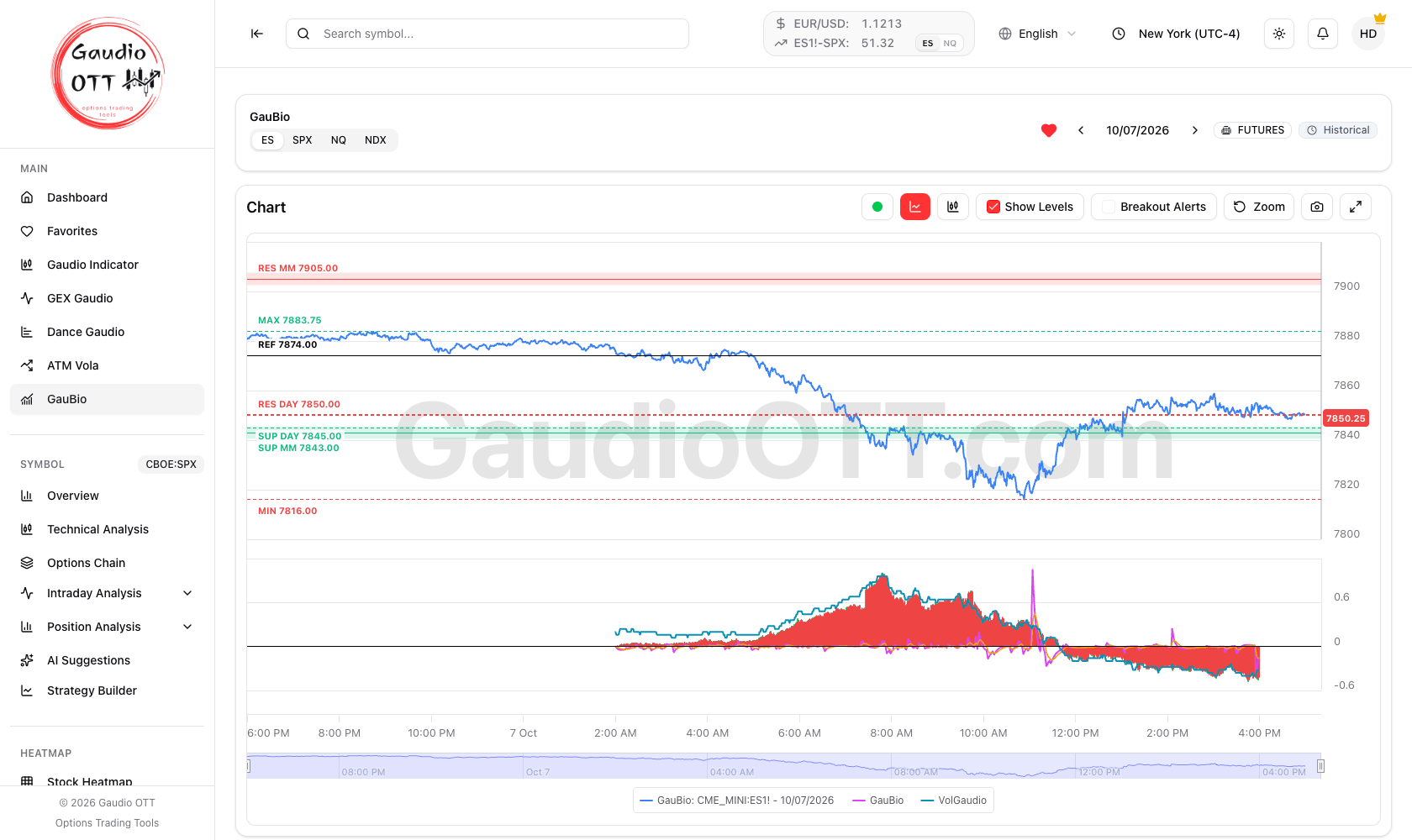
A previous ES session: the date replaces Today in the selector, and the header shows Historical instead of the refresh countdown.
Switching symbol brings you back to Today. To return to the live session from a past day, use the right arrow until the selector reads Today.
The real-time chart
Section titled “The real-time chart”The Chart panel shows how price is behaving during the session. The toolbar at the top right lets you customise the view:
- Line chart / Candlestick chart — switch between a continuous price line and Japanese candles.
- Show Levels — turn the market maker levels on the chart on or off.
- Breakout Alerts — when active, you are notified when price breaks one of the support or resistance levels.
- Zoom and pan — use the mouse wheel over the chart to zoom the time, and drag it with the left button held down to move around. On a trackpad, a horizontal two-finger swipe moves the time, while a vertical swipe and the pinch zoom; on touch devices, pinch to zoom and move with two fingers. The price scale follows the part of the chart you are looking at by itself.
- Reset zoom — restore the full interval after zooming in on recent moves.
- Save chart and Fullscreen for the display.
The market maker levels
Section titled “The market maker levels”With Show Levels active, the areas computed by GauBio appear on the chart:
- RES MM — the area above price where a rally is most likely to meet selling pressure.
- SUP MM — the area below price where a decline is most likely to find support.
- RES DAY and SUP DAY — the support and resistance references computed on the day, useful as a wider frame around the intraday levels.
Each one is labelled on the chart with its value.
These levels are not buy or sell signals: they are reference zones around which to watch how price reacts. A clean break of a level, accompanied by volume, is often more significant than a simple touch.
Breakout notifications
Section titled “Breakout notifications”Turning on Breakout Alerts makes GauBio tell you when price crosses one of the support or resistance levels — both the intraday ones and the daily references. It is a way of not having to watch the chart continuously: you get the alert and decide for yourself whether and how to act. Alerts only work on the live session: they are switched off while you look at a previous one.
The indicator panel
Section titled “The indicator panel”At the bottom of the page there is a second panel with the proprietary GauBio indicator: a pair of lines summarising the strength and direction of the move, highlighting its accelerations and slowdowns. Alongside them runs the VolGaudio line, in cyan, which adds a volatility read in the same panel.
Read together, these lines help you understand not only where price is going, but with how much push and in what volatility context.
You can show or hide each line by clicking its entry in the legend; the choice is remembered even after reloading the page.
In short
Section titled “In short”GauBio combines in one screen three pieces of information that usually have to be gathered elsewhere: where the market maker levels are, when they are broken, and in what conditions of strength and volatility price is moving. Use the levels as areas of attention, the alerts so you do not miss a break, and the lower panel to give the move context.
Common mistakes
Section titled “Common mistakes”- Treating a level touch as a signal. A clean break with volume behind it carries far more information.
- Switching symbol and keeping the previous levels in mind. Every tab has its own levels; ES and SPX are not interchangeable in price terms.
- Expecting GauBio with a paid plan. Access is by invite and independent of the plan.
- Expecting alerts in historical mode. Breakout Alerts only work on the live session.
- Reading the indicator panel alone. Its value is in combination with price and with the levels above it.
Frequently asked questions
What is GauBio in Gaudio OTT?
GauBio is an invite-only page that shows the market maker support and resistance levels overlaid on the real-time price of ES, SPX, NQ or NDX, together with a lower panel containing the proprietary GauBio indicator and the VolGaudio volatility line.
How do I get access to GauBio?
GauBio is an invite feature, not tied to any subscription plan: it is enabled individually by staff. When active on your account, the GauBio entry appears in the Main section of the side menu. If you do not see it and believe you should have access, contact support.
Which symbols does GauBio support?
Four: ES, the S&P 500 future; SPX, the S&P 500 index; NQ, the Nasdaq 100 future; and NDX, the Nasdaq 100 index. Selecting a tab updates the chart, the levels and the indicator to that symbol.
Can I look at previous sessions in GauBio?
Yes. The arrows next to the date move between sessions on ES, SPX, NQ and NDX, and the header marks the view as Historical. The chart shows that session with its levels and indicator panel; Breakout Alerts and the data refresh are switched off in that mode.
Are the GauBio market maker levels buy or sell signals?
No. They are reference zones around which to watch how price reacts. A clean break of a level accompanied by volume is generally more significant than a simple touch of it.
What is the VolGaudio line on the GauBio chart?
It is the cyan line in the lower indicator panel, which adds a volatility read alongside the GauBio indicator lines. Together they show not just the direction of the move but how much push is behind it and in what volatility context it is happening.
Can I hide individual lines in the GauBio indicator panel?
Yes. Click the entry in the legend to show or hide each line. Your choice is remembered even after reloading the page.
Related pages
Section titled “Related pages”Ready to use Gaudio OTT?
Section titled “Ready to use Gaudio OTT?”Open your free account and put what you just read into practice.