

Legs and quick strategies
There are three ways to add legs to a strategy in the Strategy Builder: clicking directly on the options chain, entering a leg by hand, or starting from a predefined quick strategy. All three can be mixed on the same position.
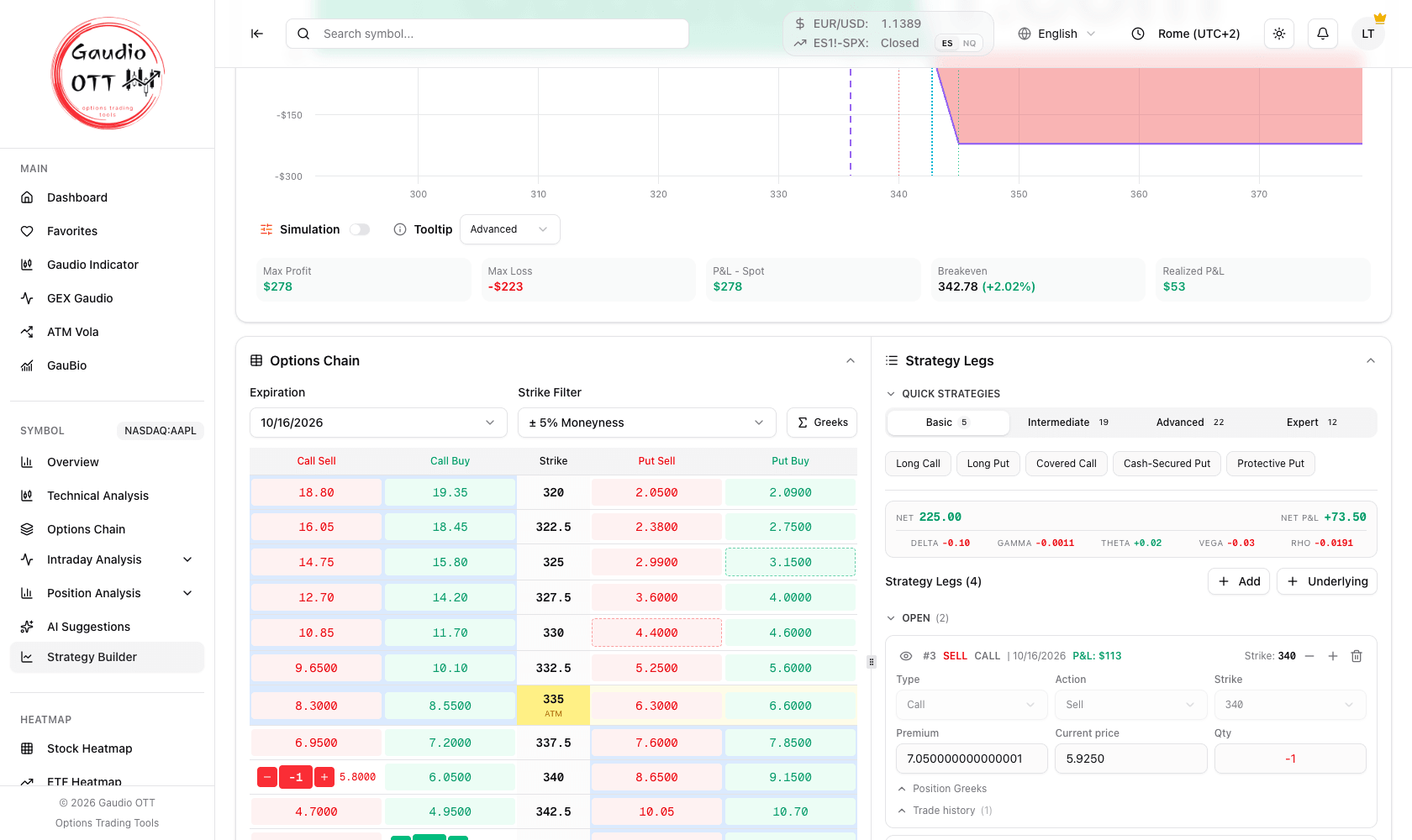
The lower half of the builder, on an Iron Condor whose put side has been closed: the chain on the left, on the right the summary strip and the legs split into Open (2) and Closed (2), each with type, action, strike, premium, current price and quantity.
A. From the options chain
Section titled “A. From the options chain”In the builder the chain shows, for each strike, four clickable prices: Sell (Bid) and Buy (Ask) on the call side, and the same two on the put side. Clicking one adds that leg at that price — the column you click is the action you are taking. Use the + and − buttons on the leg to adjust quantities.
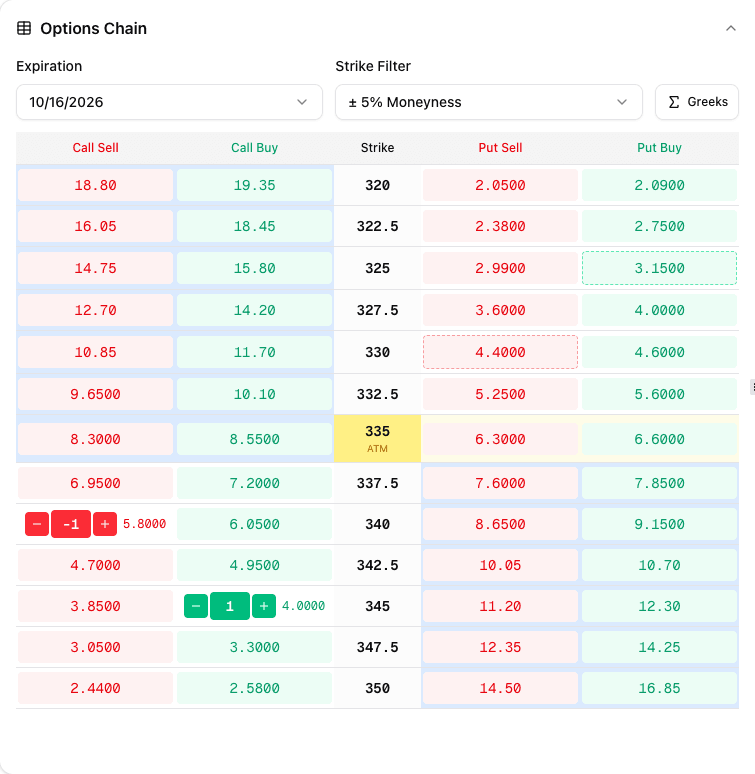
The chain inside the builder: Sell (Bid) and Buy (Ask) on the call side, the strike in the middle, the same two on the put side. The at-the-money row is highlighted.
This is the fastest route when you already know the strike, because the premium is picked up from the chain rather than typed.
B. Manual entry
Section titled “B. Manual entry”Click Add: the system inserts, by default, a bought Call on the strike closest to at-the-money. The neighbouring Underlying button adds a leg representing the underlying instrument itself instead of an option. From there you can customise:
- Type — Call or Put
- Action — Buy or Sell
- Strike
- Entry price (enter it by hand)
- Quantity
Manual entry is the right choice when you are reproducing a position you already have on with your broker, at the price you actually paid.
C. Quick strategies
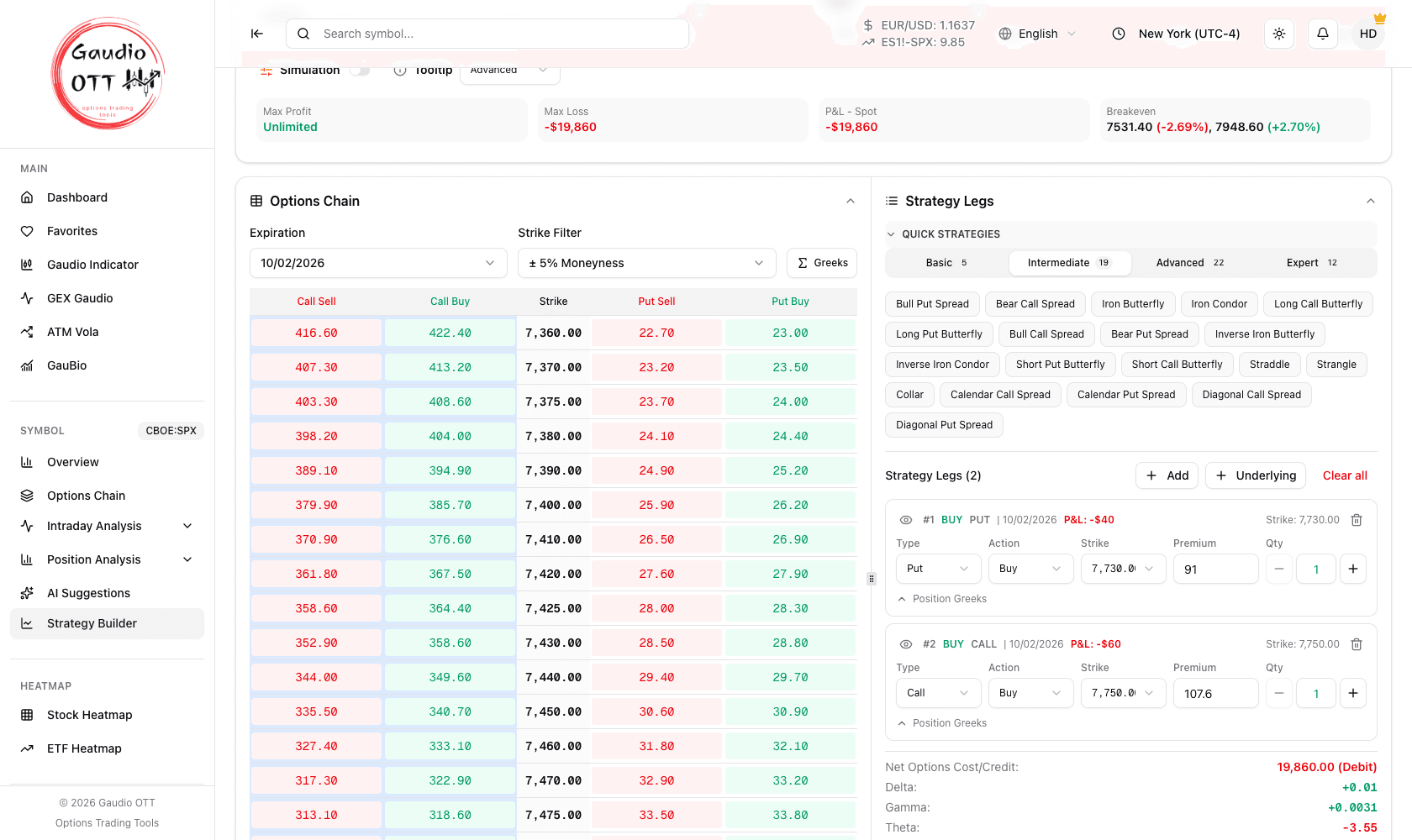
Section titled “C. Quick strategies”Open the QUICK STRATEGIES panel to see the catalogue of 58 predefined strategies, organised into four levels — the tabs show the count of each:
The quick strategy catalogue: four levels with their counts, and the strategies of the selected level.
| Level | Count | Examples |
|---|---|---|
| Basic | 5 | Long Call, Long Put, Covered Call, Cash-Secured Put, Protective Put |
| Intermediate | 19 | Bull Put Spread, Bear Call Spread, Iron Condor, Iron Butterfly, Straddle, Strangle, Collar, Calendar and Diagonal spreads |
| Advanced | 22 | Short Straddle, Short Strangle, Condors, Ratio Backspreads, Broken Wing Butterflies, Ladders, Jade Lizard |
| Expert | 12 | Ratio spreads, synthetic futures and other complex multi-leg structures |
Selecting a strategy — an Iron Condor, say — creates it automatically with the strikes closest to at-the-money. You can then customise it by moving the strikes from the leg editor or directly on the options chain.
Bid/Ask or Mid Price
Section titled “Bid/Ask or Mid Price”Above the builder there is a Use: Bid/Ask — Mid Price switch. It controls which price every valuation uses: leg entry, the At Now line, the summaries and the close dialog.
- Bid/Ask values each leg at the side you would actually trade against. Conservative, and closer to what you will really pay.
- Mid Price values each leg at
(bid + ask) / 2. Cleaner for comparing structures, but optimistic on wide spreads.
A new strategy opens on Mid Price. The choice is saved with the strategy and read back when you reopen it in edit or view mode, so all three pages show the same figures; strategies saved before this setting existed reopen on Bid/Ask.
Pick one and stay with it for a given comparison — switching mid-analysis changes every number on the screen.
Managing the legs
Section titled “Managing the legs”The legs are grouped into two collapsible sections, Open and Closed, each with its own count: the open ones are expanded, the closed ones are not. A section only appears when it holds at least one leg, so on a new strategy you see just one. On a long-running strategy the closed legs are the majority and would fill the screen with rows there is nothing left to decide about. Expired legs stay with the open ones, because they are the only rows still waiting for something from you.
Numbering does not follow the grouping: each leg keeps the number it has in the strategy, so a section may read #1, #3, #7 — that is correct.
Each leg is shown in its own panel with:
- an eye icon — disable or re-enable the leg in the payoff calculation, which is how you run what-if analysis without deleting anything;
- inline fields for Type, Action, Strike, Premium, Current price and Qty;
- Position Greeks — an expandable summary of the greeks for that single leg;
- close leg and add to position buttons, covered in Monitoring and closing;
- delete leg, with a confirmation dialog.
The Current price field is always there, on every leg: read-only when the chain quotes that leg — and it is the very price the leg is valued with — and as an editable orange field when the chain has no price, so you can enter it by hand. Where there is no price at all, neither from the chain nor yours, the field shows -.
The expiration shown on the leg is formatted in the site’s active language — as it is in the close dialog and the payoff tooltip — so switching language switches the date format too.
The overall summary is readable in two places, with the same figures:
- at the top, under the quick strategies, a compact strip: the entry Net on the left, the P&L on the right and the five greeks in columns underneath. It is there so you do not have to scroll to the bottom to read the total when the strategy has many legs;
- at the foot of the legs area, the full version: Net Options Cost/Credit marked (Debit) or (Credit), the aggregate greeks of the whole position (Delta, Gamma, Theta, Vega and Rho) and the profit and loss rows, closing on Net P&L when costs are recorded on the strategy.
Expired legs are marked EXPIRED and stay in the Open group; legs that have been closed remain visible with quantity zero, in the Closed group.
Clear all removes every leg at once — useful when you want to restart from a blank builder. It is only shown until the strategy has been saved.
Futures legs
Section titled “Futures legs”On futures underlyings a leg of type stock represents the futures contract itself and is valued with the contract’s point value, not with the standard options multiplier of 100. The builder handles this automatically; it matters when you sanity-check a cost figure by hand.
Common mistakes
Section titled “Common mistakes”- Deleting a leg to test its effect. Use the eye icon instead: it removes the leg from the payoff without losing it.
- Mixing Bid/Ask and Mid Price across a comparison. Every valuation on screen shifts with that switch.
- Building a quick strategy at the default expiration. Quick strategies are created on whichever expiration the chain is showing, with strikes at the money — on a near expiration that can put all four legs within a few points of each other.
- Assuming a quick strategy is final. Quick strategies are created at-the-money as a starting point; move the strikes to your actual thesis.
- Hand-checking a futures cost with a multiplier of 100. Futures legs use the contract point value.
Frequently asked questions
How do I add a leg to a strategy in Gaudio OTT?
Three ways: click the options chain at the strike you want and choose buy or sell; use the Add button to insert a leg manually and set type, action, strike, entry price and quantity; or pick one of the 58 predefined quick strategies, which is created automatically around the at-the-money strikes.
How many predefined strategies does the Strategy Builder offer?
58, organised into four levels: 5 Basic, 19 Intermediate, 22 Advanced and 12 Expert. They range from a Long Call to iron condors, broken wing butterflies, ladders and synthetic futures.
What is the difference between Bid/Ask and Mid Price in the builder?
Bid/Ask values each leg at the side you would actually trade against, which is conservative and closer to real execution. Mid Price values each leg at the midpoint between bid and ask, which is cleaner for comparing structures but optimistic when spreads are wide. The switch affects leg entry, the At Now line, the summaries and the close dialog.
How do I test a strategy without one of its legs?
Click the eye icon on that leg. It is removed from the payoff calculation but kept in the strategy, which is the intended way to run what-if analysis.
Where did the legs I closed go?
They stay in the strategy, with quantity zero, in the collapsible Closed section at the bottom of the legs list: one click on its header opens it. Expired legs instead stay among the Open ones, because they are still waiting for you to confirm how they ended.
Can I enter a strategy I already have with my broker?
Yes. Use manual entry and set the entry price by hand on each leg, so the position and its profit and loss reflect what you actually paid rather than the current chain price.
Are greeks shown per leg or only for the whole position?
Both. Each leg panel has an expandable Position Greeks summary for that leg alone, and the aggregate Delta, Gamma, Theta, Vega and Rho of the entire position are shown twice: in the compact strip at the top and in the full summary at the foot of the legs area, alongside the Net Options Cost/Credit.
Related pages
Section titled “Related pages”Ready to use Gaudio OTT?
Section titled “Ready to use Gaudio OTT?”Open your free account and put what you just read into practice.