

Sector performance
The Sector performance card ranks the eleven sectors of the US market from best to worst, over the period you choose, at the top right of the Dashboard.
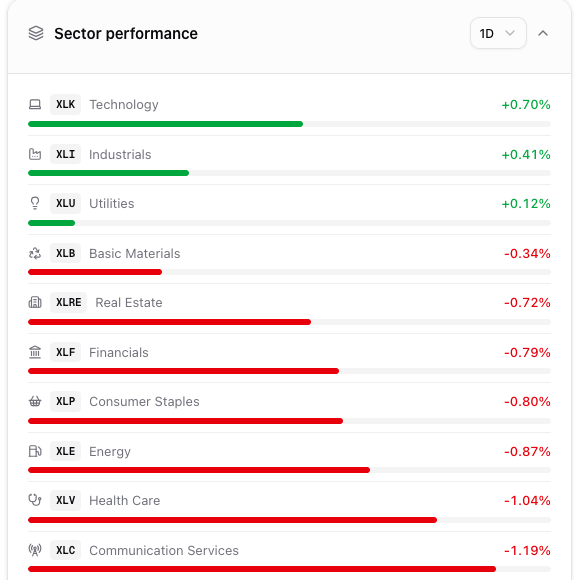
Sector performance: one row per sector, sorted best first, with a bar proportional to the size of the move.
Where it is
Section titled “Where it is”Top right of the Dashboard, below Fear & Greed and next to the Morning briefing. It is available to every signed-in user, on every plan.
What the card shows
Section titled “What the card shows”One row per sector, sorted from the best to the worst performer over the selected period. Each row carries:
- the sector ETF ticker and the name of the sector;
- the percentage change over the period, green if positive, red if negative;
- a bar whose length is proportional to the size of the move, scaled against the largest absolute move on the card.
The eleven sectors are the standard US sector ETFs: XLK Technology, XLI Industrials, XLU Utilities, XLB Basic Materials, XLP Consumer Staples, XLRE Real Estate, XLF Financials, XLE Energy, XLC Communication Services, XLY Consumer Discretionary, XLV Health Care.
When a value is not available the row shows n/a with no bar, and stays at the bottom of the list.
Choosing the period
Section titled “Choosing the period”The selector in the header switches the ranking between 1D, 1W, 1M, 3M, YTD and 1Y. The card reorders itself around the new period, and your choice is remembered by the browser: if you follow the year, you do not have to reselect it at every visit.
1D is the change on the previous close and moves during the session. The longer periods are measured from the closing price of the reference date and update a few times a day.
Why traders use it
Section titled “Why traders use it”Rotation shows up in the ranking before it shows up in the index. A day where Energy and Financials lead while Technology lags is a different market from one where the same index change comes from megacap tech alone — and it changes which underlying is worth opening.
Comparing two periods is the fastest read: a sector at the bottom over 1D but at the top over 3M is a pullback inside a trend, not a reversal.
How to use it inside Gaudio OTT
Section titled “How to use it inside Gaudio OTT”Clicking a row opens the symbol overview of that sector ETF, which becomes the active symbol: from there you can go straight to its options chain or to the intraday analyses in the side menu.
For the same picture at single-stock granularity, use the heatmaps, which group companies by sector and colour them by performance.
Collapsing it
Section titled “Collapsing it”Click the header to collapse the card; the choice is remembered by your browser. The period selector stays usable inside the header — using it does not close the card. The Collapse all button in the Morning briefing header collapses or reopens the three top cards together.
Common mistakes
Section titled “Common mistakes”- Reading the bar as an absolute scale. The bars are scaled against the largest move on the card, so they compare sectors with each other, not two different days.
- Comparing periods without switching the selector. The ranking only refers to the period selected in the header.
- Expecting single stocks. The card tracks sector ETFs; for company-level detail use the heatmaps.
- Reading
1Dbefore the US open. Until the session starts, the daily change is close to zero for every sector: use a longer period to see the trend.
Frequently asked questions
What does the Sector performance card show on the Gaudio OTT dashboard?
It ranks the eleven US sectors from best to worst over the selected period, each with its ETF ticker, its percentage change in green or red and a bar proportional to the size of the move.
Which periods can I choose for sector performance?
1 day, 1 week, 1 month, 3 months, year to date and 1 year. The selector is in the card header and your choice is remembered by your browser for the next visit.
Which sectors are tracked?
The eleven standard US sectors through their ETFs: XLK Technology, XLI Industrials, XLU Utilities, XLB Basic Materials, XLP Consumer Staples, XLRE Real Estate, XLF Financials, XLE Energy, XLC Communication Services, XLY Consumer Discretionary and XLV Health Care.
What happens when I click a sector?
The symbol overview of that sector ETF opens and it becomes the active symbol, so every page in the Symbol section of the side menu then refers to it.
Which plans include the Sector performance card?
All of them. It is shown to every signed-in user, including the Free plan.
Related pages
Section titled “Related pages”Ready to use Gaudio OTT?
Section titled “Ready to use Gaudio OTT?”Open your free account and put what you just read into practice.