
AI Suggestions
AI Suggestions computes, in real time, the best premium-selling and vertical-spread opportunities on the symbol you are currently looking at. It is the single-symbol counterpart to the Opportunities Scanner: same structures and same metrics, but computed on demand for one underlying instead of read from a market-wide scan.
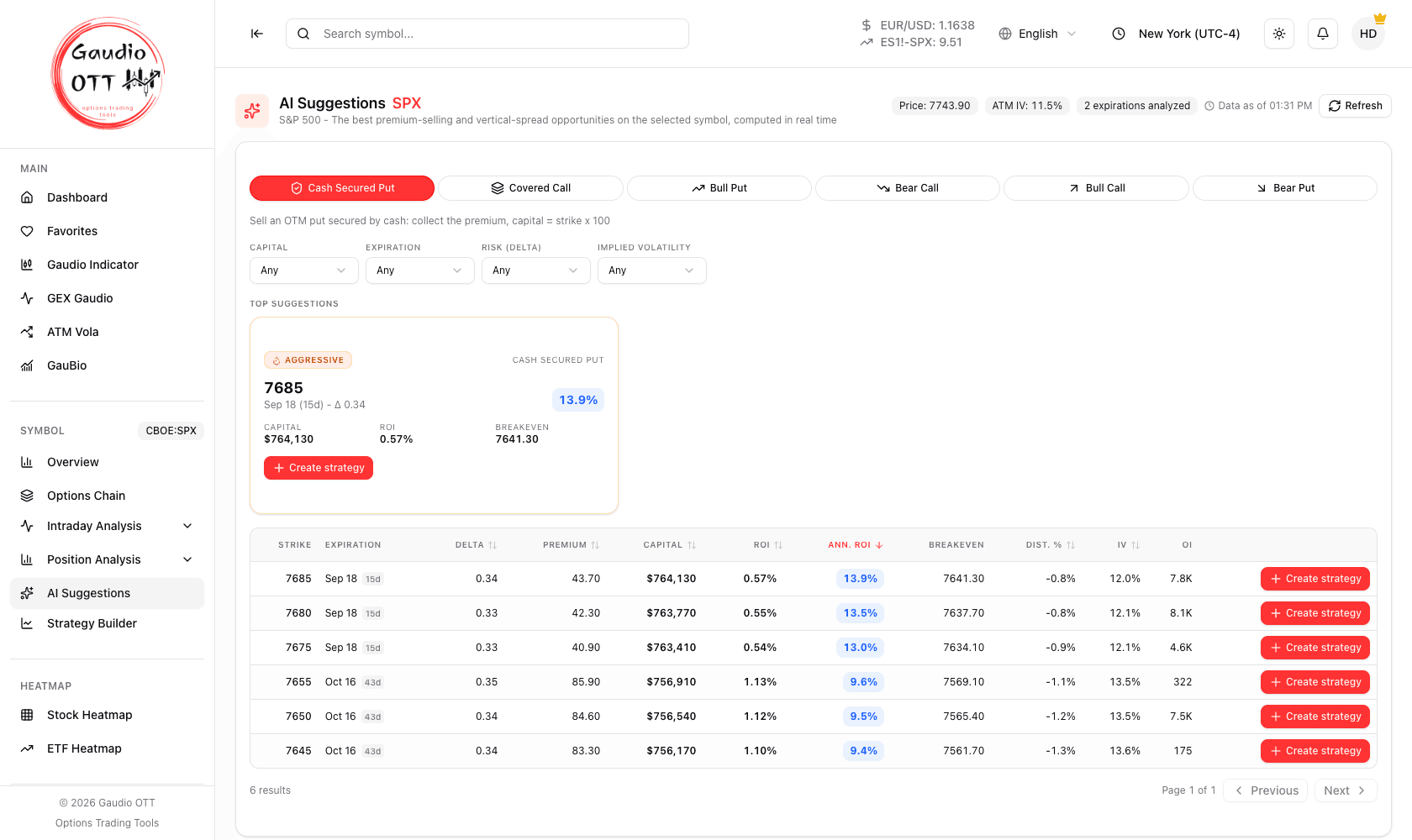
AI Suggestions on SPX: the context chips, the highlighted top suggestion, and every opportunity found on the symbol.
Where it is
Section titled “Where it is”Side menu, Symbol → AI Suggestions. It refers to the active symbol. Available on the Strategy and Ultra plans.
Top suggestions
Section titled “Top suggestions”At the top of the page sit the Top suggestions: a small set of highlighted structures, each labelled with a risk profile.
| Profile | What it favours |
|---|---|
| Conservative | Lower short-leg delta, greater distance from spot |
| Balanced | A middle ground between premium collected and distance |
| Aggressive | Higher premium, accepting a closer strike |
Each card can be sent straight into the Strategy Builder with its legs prefilled.
The full table
Section titled “The full table”Below the highlights, a table lists every opportunity found on this symbol, with Strike, Expiration (and days to expiration), Delta, Premium, Capital, ROI, Ann. ROI, Breakeven, Dist. %, IV and OI. Every column can be used as the sort key, and each row has its own Create strategy action.
Because the symbol is already fixed, the filter set is shorter than the scanner’s: Capital, Expiration, Risk (delta) and Implied volatility. The scanner’s symbol, market cap, volume and day-change filters are not needed here.
The header also shows the context of the computation as chips: the underlying Price, its ATM IV, the number of expirations analysed, and the Data as of time — the moment the figures on screen were computed.
Refreshing
Section titled “Refreshing”Unlike the scanner, this page is computed on demand for one symbol: the Refresh button recomputes it against the current chains, and while it runs the page shows Analyzing option chains….
Which symbols are supported
Section titled “Which symbols are supported”- Stocks, indices and ETFs with listed options — all six strategies are offered.
- Futures — only the vertical spreads are offered (Bull Put, Bear Call, Bull Call, Bear Put). Cash Secured Put and Covered Call are excluded because they would require the full notional of the contract.
- Instruments with no scannable options in the 7–60 day window report that explicitly, as do instrument types the analysis does not support.
Why traders use it
Section titled “Why traders use it”The scanner answers “where in the market is there something worth doing today”. This page answers the question you actually have more often: “I already want exposure to this name — what is the best structure on it right now”. Because it is computed on demand, it reflects the current chain rather than the last market-wide scan, which matters when the underlying has moved during the session.
Common mistakes
Section titled “Common mistakes”- Reading the profiles as recommendations. Conservative, Balanced and Aggressive describe where each structure sits on the delta-versus-premium trade-off, not a suitability judgement.
- Forgetting to refresh after a move. The page is computed on demand; a stale computation will not reflect a price that has moved.
- Expecting Cash Secured Put or Covered Call on a futures symbol. Only vertical spreads are offered there.
- Ignoring Open Interest. A high-ROI structure on a strike with almost no Open Interest is unlikely to fill at the shown price.
Frequently asked questions
What is AI Suggestions in Gaudio OTT?
A page that computes in real time the best premium-selling and vertical-spread opportunities on the symbol currently active, with a set of highlighted top suggestions labelled Conservative, Balanced and Aggressive, plus a full sortable and filterable table of every opportunity found.
How is AI Suggestions different from the Opportunities Scanner?
The Opportunities Scanner reads from a periodic market-wide scan of over 200 US underlyings. AI Suggestions is computed on demand for the single active symbol, so it reflects the current option chains rather than the last scan. The structures, columns and filters are the same.
What do the Conservative, Balanced and Aggressive profiles mean?
They describe where each highlighted structure sits on the trade-off between premium collected and distance from spot. Conservative favours a lower short-leg delta and a strike further away, Aggressive favours a higher premium with a closer strike, and Balanced sits between the two.
Does AI Suggestions work on futures?
Partly. On futures only the four vertical spreads are offered — Bull Put, Bear Call, Bull Call and Bear Put. Cash Secured Put and Covered Call are excluded because they would require the full notional of the contract.
Which plans include AI Suggestions?
Strategy and Ultra. It is not available on the Free or Premium plans.
Why does AI Suggestions say there are no options for this symbol?
Because the instrument has no scannable options in the 7 to 60 day window used by the analysis, or because its instrument type is not supported. The message on the page states which of the two applies.
Related pages
Section titled “Related pages”Ready to use Gaudio OTT?
Section titled “Ready to use Gaudio OTT?”Open your free account and put what you just read into practice.