

Morning briefing
The Morning briefing is the card that opens the Dashboard: one edition per morning that recaps the last session, lists the key takeaways, shows the closes and states what is worth watching during the day.
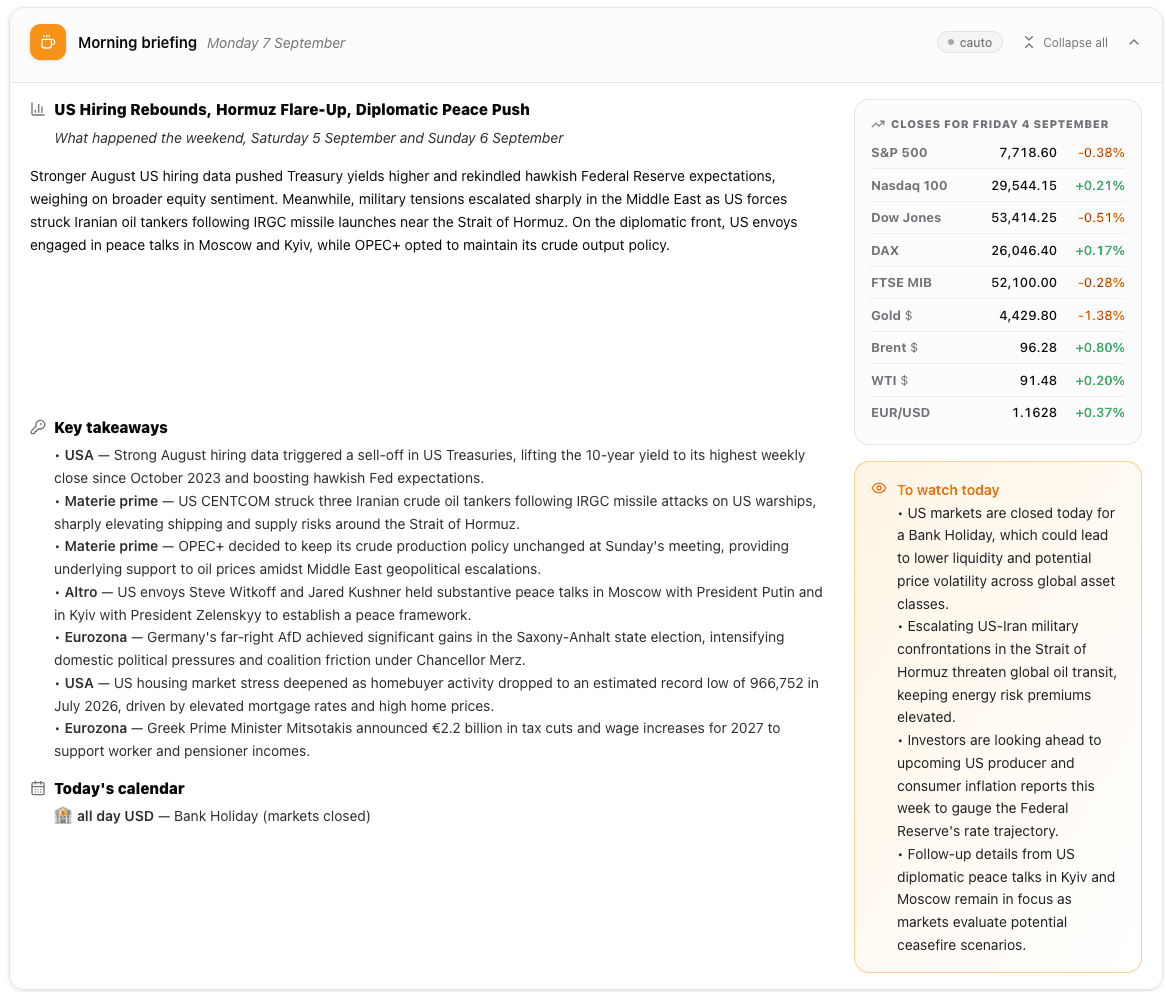
The Morning briefing: the narrative on the left, the closes of the last session and the “To watch today” callout on the right.
Where it is
Section titled “Where it is”At the very top of the Dashboard, above the “Your Symbols” heading. It is available to every signed-in user, on every plan, including Free.
What the card shows
Section titled “What the card shows”The header carries the date of the edition, so you always know which morning you are reading, and a short chip with the tone of the session.
The body is organised in two columns.
On the left, the narrative:
- the headline of the edition and the period it covers;
- a summary of what moved the markets;
- Key takeaways, one bullet per theme, each tagged by area (US, Eurozone, commodities, and so on);
- Data surprises, when a macro release came out away from expectations;
- Today’s calendar, the macro events scheduled for the day.
On the right, the data:
- the closes of the last session — US and European indices, gold and oil, EUR/USD — each with its percentage change in green or red;
- To watch today, the amber callout with the events and risks to keep an eye on during the session.
Not every section appears every day: the briefing carries what the morning actually produced. Sections with nothing to report are simply absent.
Why traders use it
Section titled “Why traders use it”It replaces the ten-minute scan of news sites you would otherwise do before the open. In one card you get what closed where, what happened overnight, and which macro releases can move the session you are about to trade — before you open the first symbol of the day.
When it is published, and what happens on quiet days
Section titled “When it is published, and what happens on quiet days”A new edition arrives each morning. On days without a new one — weekends, holidays — the last published edition stays visible, with its own date in the header: nothing goes blank, and the date tells you at a glance that you are reading Saturday’s edition on a Sunday.
The briefing follows the app language: switching between Italian and English from the top bar swaps the edition immediately. If an edition is not available in your language, the other one is shown rather than an empty card.
Collapsing it
Section titled “Collapsing it”Click anywhere on the header to collapse the card, and click again to reopen it. The choice is remembered by your browser, so if you close the briefing it stays closed on your next visit, and the market cards next to it spread across the freed width.
The Collapse all button in the header collapses (or reopens) the three top cards together — Morning briefing, Fear & Greed and Sector performance — while each card keeps its own independent control.
Common mistakes
Section titled “Common mistakes”- Treating it as a trading recommendation. It is a market recap: it describes what happened and what is scheduled, it does not tell you what to do.
- Reading yesterday’s edition as today’s. The date sits next to the title in the header for exactly this reason; on Sunday it is Saturday’s edition.
- Expecting live prices in the closes table. Those are the closing values of the last session, not live quotes — for those use the dashboard cards below.
- Looking for it after you collapsed it. A collapsed card keeps only its header: click it to reopen.
Frequently asked questions
What is the Morning briefing on the Gaudio OTT dashboard?
It is the card at the top of the dashboard with one edition per morning: the headline and summary of the last session, the key takeaways, any data surprises, the day's macro calendar, the closes of the previous session and a To watch today callout.
Which plans include the Morning briefing?
All of them. It is shown to every signed-in user, including the Free plan.
What happens on a day with no new briefing?
The last published edition stays visible with its own date in the header, so on a Sunday you keep reading Saturday's edition rather than seeing an empty card.
Is the briefing available in English and Italian?
Yes. It follows the app language and switching language from the top bar swaps the edition immediately. If an edition is missing in your language, the other one is shown.
How do I hide the Morning briefing?
Click its header to collapse it. Your browser remembers the choice, so it stays collapsed until you reopen it, and the market cards next to it use the freed width. The Collapse all button in the header does the same for the three top cards at once.
Related pages
Section titled “Related pages”Ready to use Gaudio OTT?
Section titled “Ready to use Gaudio OTT?”Open your free account and put what you just read into practice.