

Import from your broker
Import from broker turns the positions you actually hold into a strategy in the Strategy Builder: you choose an underlying, tick the legs you want, and they arrive with the quantity, price and date of your account. From there you read the payoff, simulate and save it like any other strategy.
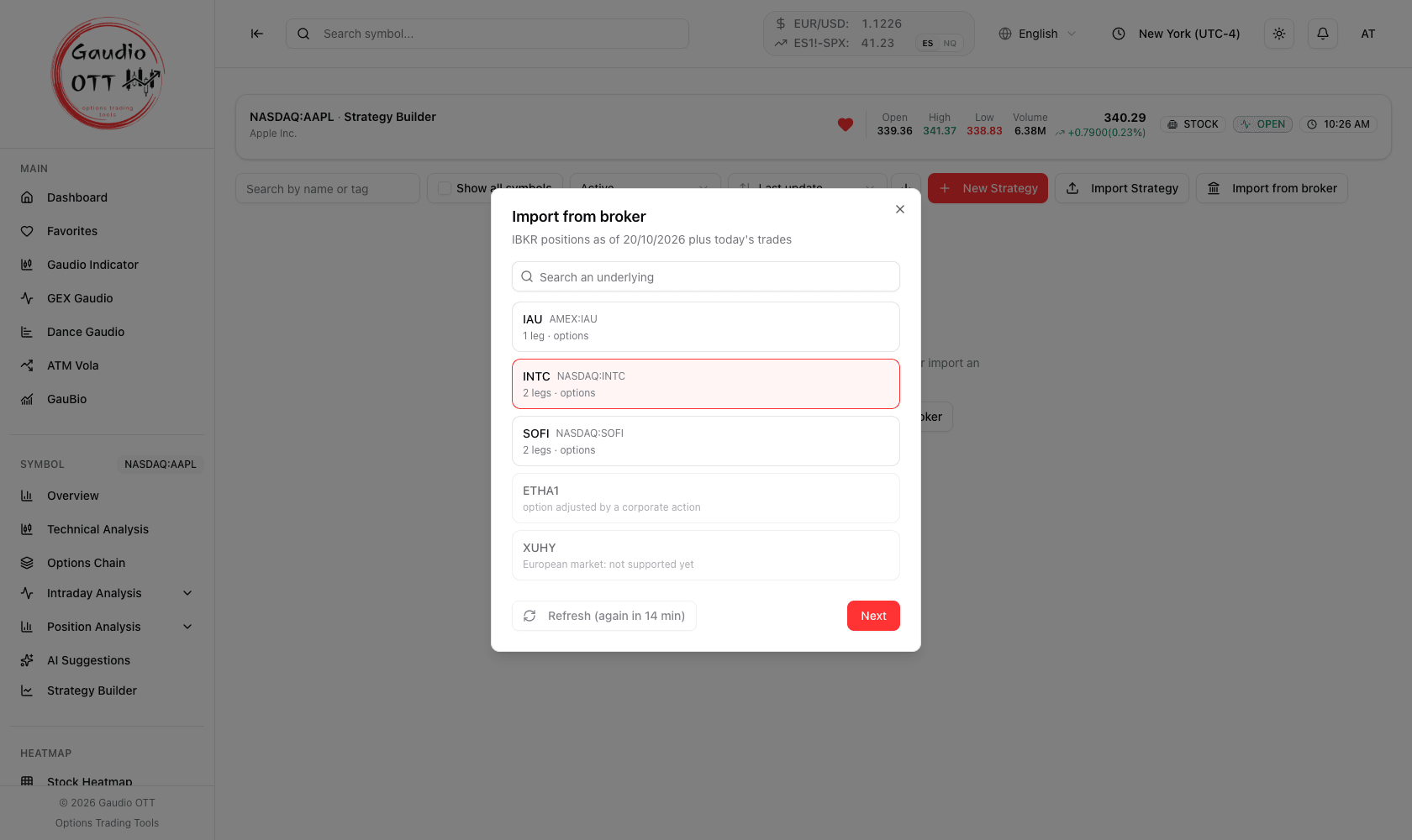
The first step: the underlyings in your account, each with how many legs it has and of what kind.
Before you start
Section titled “Before you start”- Your broker must be connected: see Connect your broker.
- Available on the Strategy and Ultra plans.
How to import a position
Section titled “How to import a position”-
Open the Strategy Builder on any symbol: the list of saved strategies opens.
-
Click Import from broker.
-
Choose the underlying. The list shows every underlying in your account, with the number of legs and whether they are shares, options or futures. The symbol you are on comes first and is already selected. With many underlyings, a search box helps you find one.
-
Click Next and choose the legs. Each one shows quantity, contract and price, plus a short note — when it was opened, or that it expires today. Untick the ones you do not want in this strategy.
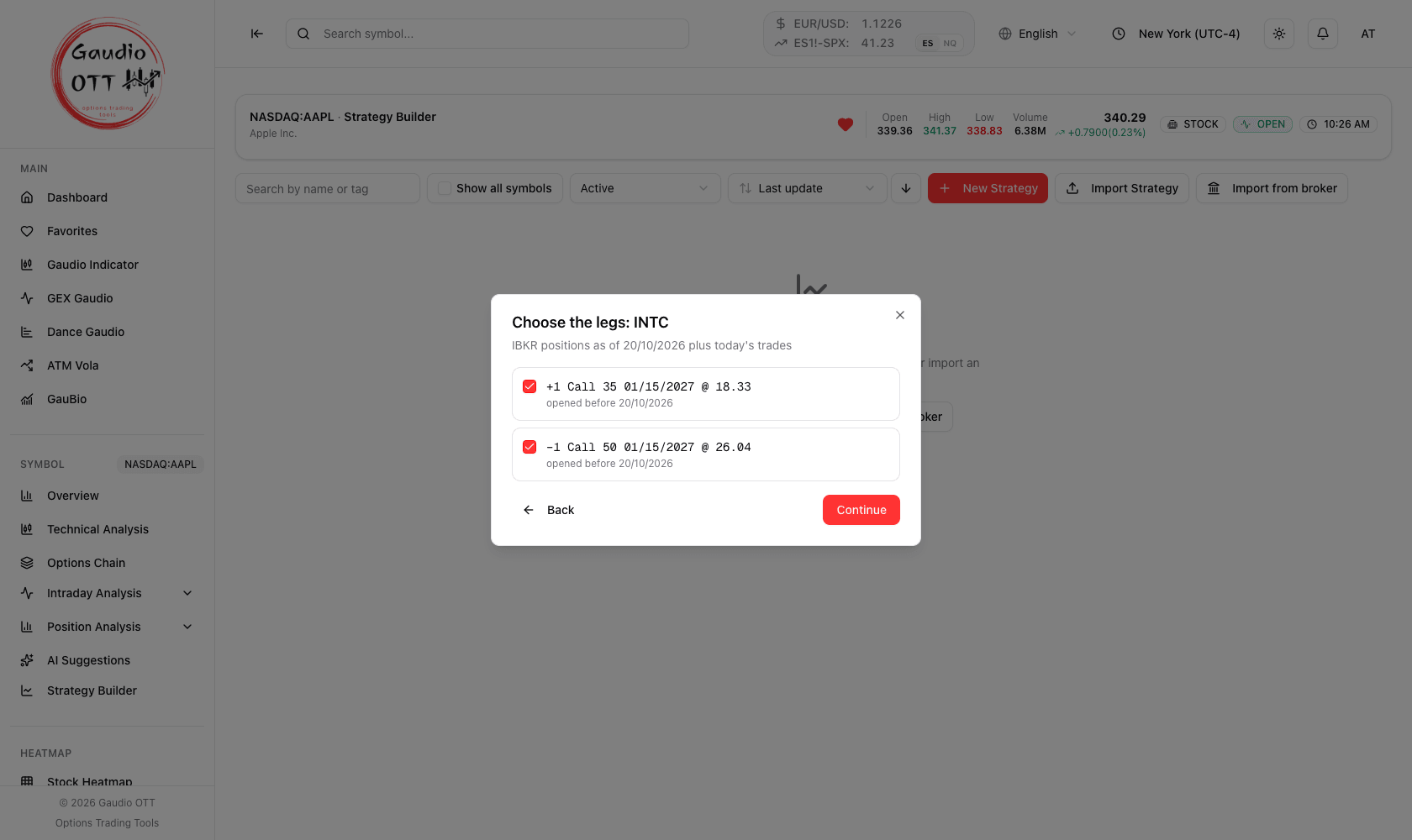
The legs of the underlying you chose. Expired legs and legs already in another strategy start unticked.
-
Click Continue and choose Quick or Advanced mode.
-
The strategy opens not saved yet: check it, give it a name and click Save.
The commissions your broker charged on those openings are added to the strategy costs when you save; the window tells you the amount.
What the notes on a leg mean
Section titled “What the notes on a leg mean”- opened on … / opened before … — the date the position was opened, as your broker records it.
- already in “…” — this position is already in one of your saved strategies. It starts unticked so you do not import it twice, but you can still tick it.
- expired / expires today — an expired leg starts unticked.
- outside our chain — the contract is not in our options chain right now; it is imported at your broker’s price of the report date.
Legs Gaudio OTT cannot represent are listed apart under Not importable, each with a short reason — for example a European market, which is not supported yet.
Which positions you see
Section titled “Which positions you see”- The positions are those of your broker’s latest report, normally the previous close. If you connected the Trade Confirmation report, today’s trades are included too, during the US trading day.
- Refresh asks your broker for a new report. It can be used again after 15 minutes; the button tells you how long to wait.
- Supported today: US stocks and ETFs, US indices with their options, CME futures and options on futures. European markets come later.
Common mistakes
Section titled “Common mistakes”- Looking for Import from broker before connecting. Connect your broker in Settings first.
- Importing a position twice. A leg marked already in “…” is in another strategy: leave it unticked unless you mean to split it.
- Expecting this morning’s trade without the Trade Confirmation report. Without it you see the previous close.
Frequently asked questions
Where is Import from broker?
In the Strategy Builder, in the list of saved strategies, next to Import Strategy. It needs your broker connected in Settings, on the Strategy or Ultra plan.
Is the imported strategy saved automatically?
No. It opens as a new strategy to review: give it a name and click Save when it looks right.
Can I import only some of the legs?
Yes. Tick only the legs you want: the others stay in your account, and you can import them into another strategy later.
Why is a leg under Not importable?
Gaudio OTT cannot represent it yet — for example a European market, or a contract that is not in our options chain and has no price. The reason is shown next to the leg.
Does importing change anything at my broker?
No. Gaudio OTT only reads your positions; nothing is sent to your broker.
Related pages
Section titled “Related pages”Ready to use Gaudio OTT?
Section titled “Ready to use Gaudio OTT?”Open your free account and put what you just read into practice.