
Align a strategy with IBKR
Align with IBKR brings a saved strategy up to date with what you did at your broker: it lists the trades not yet recorded in the strategy, you tick the ones that belong to it, and Apply writes them into its history. Nothing changes until you click Apply.
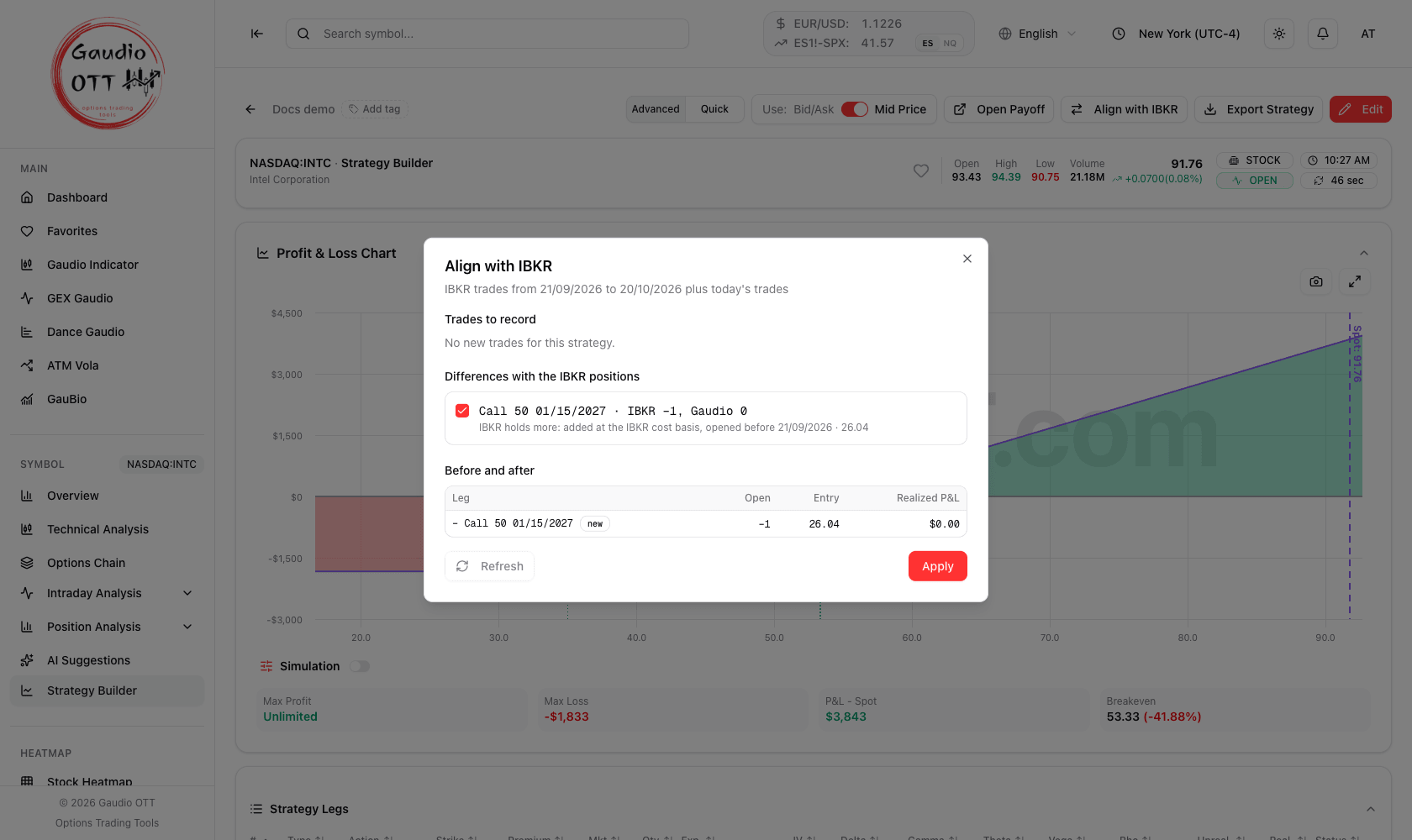
No new trades for this strategy, but a leg that is open at the broker and missing in the strategy: ticked under Differences with the IBKR positions, it shows up as a new leg in Before and after.
When to use it
Section titled “When to use it”- You closed or reduced a leg at your broker and want the strategy to show it, with the real price.
- You added to a position, or rolled to another strike or expiration.
- An option expired or was assigned.
- You recorded a trade by hand and want the exact price and time from your broker.
Your broker must be connected — see Connect your broker — and the strategy must be saved.
Where to find it
Section titled “Where to find it”- On the strategy card in the list, the button with the two arrows.
- On a saved strategy in Advanced mode, the Align with IBKR button, both when viewing and when editing. If you have unsaved changes, save them first.
In Quick mode, align from the strategy card.
How to align
Section titled “How to align”- Click Align with IBKR. The window reads your latest trades.
- Under Trades to record, check the proposals: each trade says what it does — Close, Reduce, Add, New leg, a Split, an expiration or an assignment — with quantity, contract, price and date. They start ticked; untick what does not belong to this strategy.
- Look at Before and after: open quantity, entry price and realized P&L of each leg that changes.
- Click Apply. The strategy reloads with the new history.
The other sections of the window
Section titled “The other sections of the window”- Include only if they belong to this strategy — trades from before the strategy, or on contracts it does not hold, such as an earlier position on the same contract that you closed before. They start unticked: tick them only if they really are part of this strategy.
- Trades already recorded — already in this or another strategy (already recorded in “…”), so they are never recorded twice.
- Not proposed — trades that cannot be applied here, each with a short reason.
- Differences with the IBKR positions — if, after the trades, a leg still does not match what your broker holds, it is shown here. Where needed, enter the price and tick it to fix the strategy.
- Add the IBKR commissions to the costs — ticked by default, adds the commissions of the chosen trades to the strategy costs.
If your report has several accounts, the window first asks which one belongs to this strategy, and remembers it.
Common mistakes
Section titled “Common mistakes”- Applying a trade that belongs to another strategy. If the same position is split across strategies, untick it here and align it from the other strategy.
- Waiting too long between alignments. Your broker’s report covers the last 30 days: older trades no longer appear, and the window tells you how many days are not covered. The position differences then let you fix the strategy anyway.
- Aligning with unsaved changes. Save first: alignment writes on the saved strategy.
Frequently asked questions
Does Align with IBKR change my strategy automatically?
No. It only proposes the trades; nothing changes until you review them and click Apply.
Can the same trade end up in two strategies?
No. A trade already recorded in one of your strategies is shown as already recorded and is not proposed again.
I recorded a trade by hand: will it be duplicated?
No. If your broker has the same trade within a few days, the window proposes to correct your entry with the exact price and time instead of adding a new one.
Why is the Align with IBKR button greyed out?
The strategy has unsaved changes. Save it, then align.
Can I align a strategy I built by hand, not imported?
Yes. The window matches your trades to the legs of the strategy by contract, whether you imported it or built it yourself.
Related pages
Section titled “Related pages”Ready to use Gaudio OTT?
Section titled “Ready to use Gaudio OTT?”Open your free account and put what you just read into practice.